

What it is
The Commit Commands Plugin (name: commit-commands, version 1.0.0, author Anthropic) automates common git operations. Its goal is to cut down on context switching and on running commands by hand. Instead of typing several git commands, you run a single slash command to handle your workflow. The plugin provides three commands: /commit, /commit-push-pr, and /clean_gone.
/commit creates a git commit with a message generated from your staged and unstaged changes. It:
- analyzes the current git status
- reviews both staged and unstaged changes
- examines recent commit messages so it can match your repository's style
- drafts a commit message, stages the relevant files, and creates the commit
It follows conventional commit practices. It avoids committing files with secrets such as .env and credentials.json. It also includes Claude Code attribution in the commit message.
/commit-push-pr runs the full workflow in one step:
- creates a new branch if you are currently on main
- stages and commits your changes
- pushes the branch to origin
- creates a pull request using gh pr create
- gives you the PR URL
It analyzes all commits in the branch, not just the latest one. The PR description it writes includes a summary of changes (1-3 bullet points), a test plan checklist, and Claude Code attribution.
/clean_gone removes local branches that have been deleted from the remote repository. It:
- lists local branches to find those with [gone] status
- removes any worktrees associated with those branches
- deletes the [gone] branches
- reports what was removed, or that no cleanup was needed
It handles both regular branches and worktree branches. It removes worktrees safely before deleting branches.
Who it's for
- Developers using Claude Code who want to commit changes without writing commit messages by hand
- Developers working with feature branches who want to commit, push, and open a GitHub pull request in one step
- Anyone whose local branch list is cluttered with stale branches after PRs are merged and remote branches deleted
- Users who want to reduce context switching and manual git command execution
Requirements
Requirements
- Git must be installed and configured
- Repository must be a git repository with a remote
- For /commit-push-pr: GitHub CLI (gh) must be installed and authenticated
- For /commit-push-pr: repository must have a remote named origin
Setup
Plugin availability
This plugin is included in the Claude Code repository. The commands are automatically available when using Claude Code.
Install GitHub CLI (for /commit-push-pr)
If /commit-push-pr fails to create a PR, install the GitHub CLI. Use brew on macOS, or see the GitHub CLI installation page (https://cli.github.com/).
bashbrew install ghAuthenticate GitHub CLI
Authenticate gh so /commit-push-pr can create pull requests. The repository must also have a GitHub remote.
bashgh auth login
بلَجن من Anthropic بيسهّلك شغلك مع git بأوامر بسيطة: /commit بيكتبلك رسالة الكومِت لحالو، و/commit-push-pr بيعمل كومِت وبوش وبيفتح PR بخطوة وحدة. أما /clean_gone فبينضّفلك البرانشات المحلية يلي انمحت من الريموت.
Examples
Commit changes with /commit
bash# Make some changes to your code
# Then simply run:
/commit
# Claude will:
# - Review your changes
# - Stage the files
# - Create a commit with an appropriate message
# - Show you the commit statusWhat it does: Run /commit after making changes. Claude reviews the changes, stages the files, and commits with a message drafted to match your repo's style.
Commit, push, and open a PR with /commit-push-pr
bash# Make your changes
# Then run:
/commit-push-pr
# Claude will:
# - Create a feature branch (if needed)
# - Commit your changes
# - Push to remote
# - Open a PR with summary and test plan
# - Give you the PR URL to reviewWhat it does: This single command creates a branch if needed, commits, pushes to origin, opens a PR via gh, and returns the PR URL.
Clean up stale branches with /clean_gone
bash# After PRs are merged and remote branches are deleted
/clean_gone
# Claude will:
# - Find all branches marked as [gone]
# - Remove any associated worktrees
# - Delete the stale local branches
# - Report what was cleaned upWhat it does: Use this after merging PRs to remove local branches (and their worktrees) whose remote branches have been deleted.
Feature branch workflow
bash# Develop feature across multiple commits
/commit # First commit
# More changes
/commit # Second commit
# Ready to create PR
/commit-push-prWhat it does: Use /commit for incremental commits during development, then /commit-push-pr when ready. It analyzes the full branch history to build the PR description.
Related
 Skill
Skill commit-commands
Commands for git commit workflows including commit, push, and PR creation
 Skill
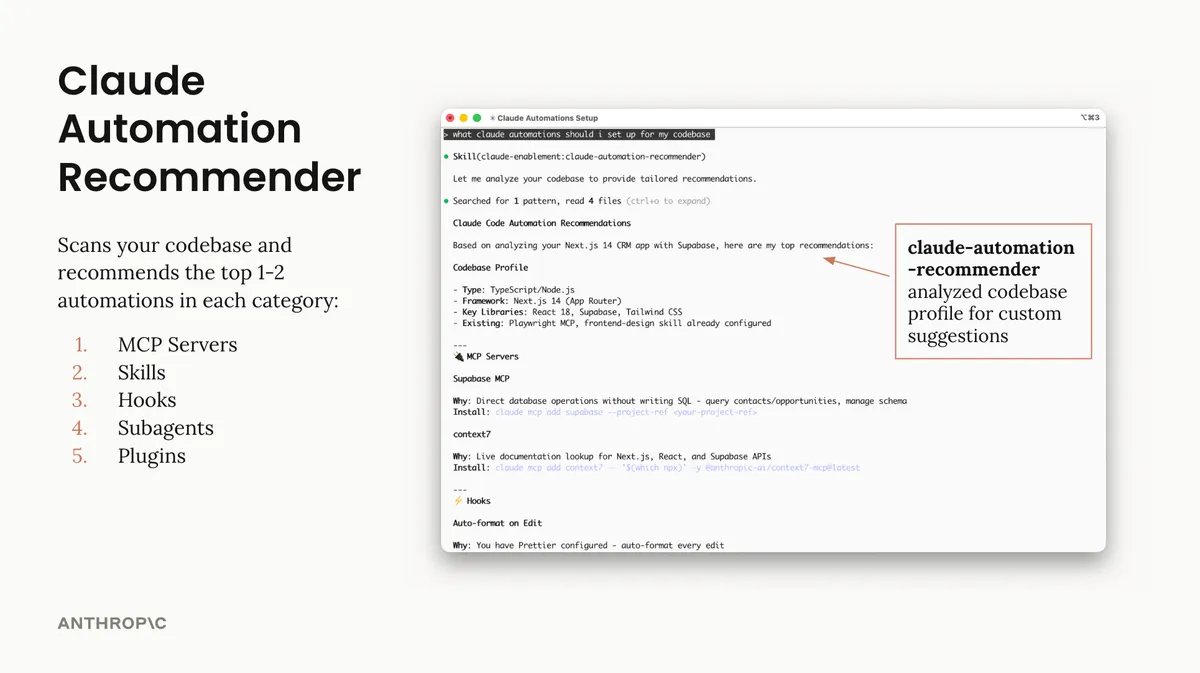
Skill claude-code-setup
Analyze codebases and recommend tailored Claude Code automations such as hooks, skills, MCP servers, and subagents.
 Skill
Skill code-review
Automated code review for pull requests using multiple specialized agents with confidence-based scoring to filter false positives
 Skill
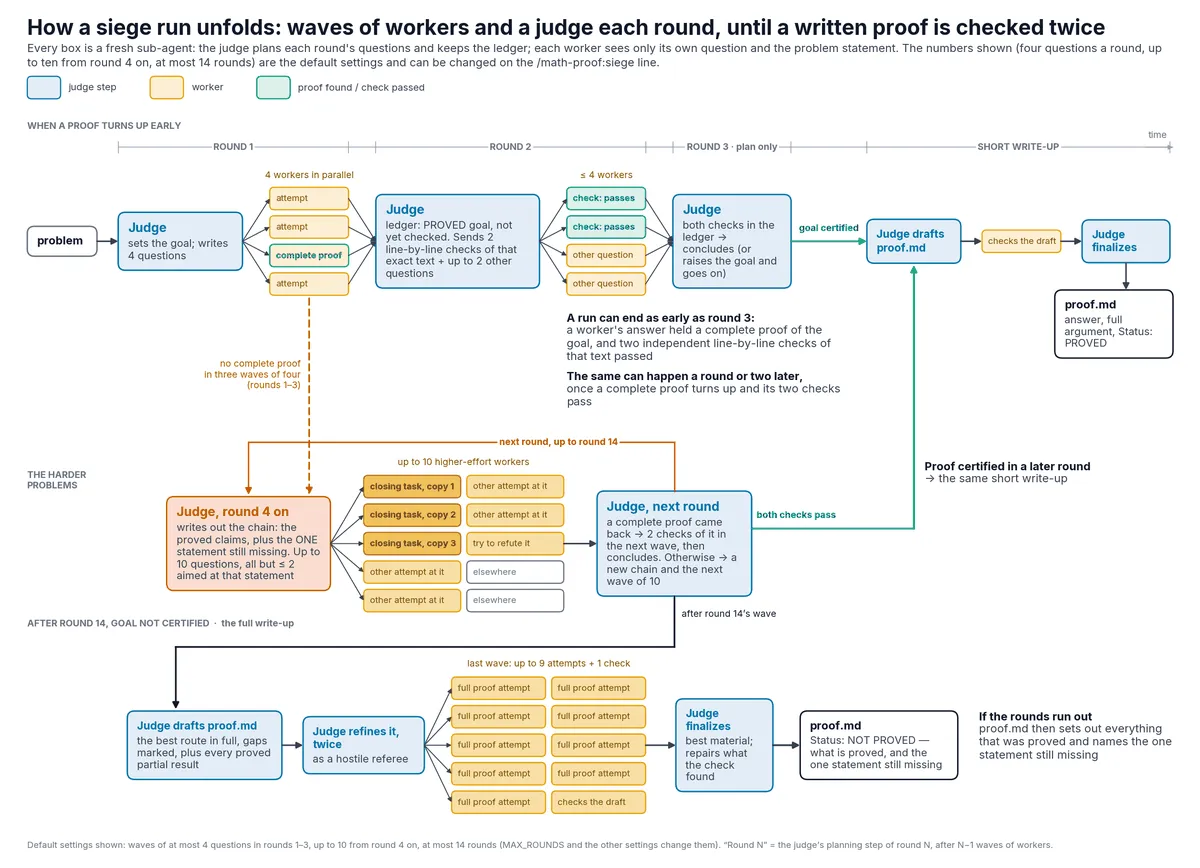
Skill math-proof
Two skills for hard mathematics problems, each ending in a self-contained proof.md: /math-proof:solo has the session work the problem itself in stages with a notes file; /math-proof:siege works on it for hours in rounds of judge and worker sub-agents and says plainly what is and is not proved.
 Skill
Skill ralph-loop
Interactive self-referential AI loops for iterative development, implementing the Ralph Wiggum technique. Claude works on the same task repeatedly, seeing its previous work, until completion.
 Skill
Skill cowork-plugin-management
Create, customize, and manage plugins tailored to your organization's tools and workflows. Configure MCP servers, adjust plugin behavior, and adapt templates to match how your team works.