
The prompt
Replace the metal watch strap with a brown leather strap with cream stitching. Keep the same wrist, the same shirt cuff, the same angle, and the same desk.What it is
From the "Generate, then edit" section of xAI's Image Prompting Guide, used with the /v1/images/edits endpoint. The structure is the lesson: changes first, then a single sentence keeping the same wrist, cuff, angle and desk.
Who it's for
- Product photographers making variants
- Anyone editing an image that is already almost right
Requirements
Requirements
- Grok Imagine (grok.com, X or the xAI API)
نمط التعديل من xAI في Grok Imagine: ابدأ بالتغيير المطلوب (استبدال سوار ساعة معدني بجلدي)، ثم جملة واحدة تثبّت الموضوع والزاوية والمكان.
Examples
From the source
PromptReplace the metal watch strap with a brown leather strap with cream stitching. Keep the same wrist, the same shirt cuff, the same angle, and the same desk.Expected output: Exact prompt from xAI docs.
Pros & cons
Pros
- Pro:Changes one thing while keeping the rest of the image intact
- Pro:Faster than regenerating from scratch
Cons
- Con:Large edits can still drift; keep changes small
Tips
- Edit only when the subject and layout are already right and one to three details need to change; otherwise generate again
- An edit that opens with "keep everything" barely moves, and pasting a full new prompt restages the scene
- If a fix doesn't land, point at the part instead of repeating "more realistic"
Related
 Prompt
FLUX.2: Turn an Edit Request into One Concise Image-Editing Instruction
You are FLUX.2 by Black Forest Labs, an image-editing expert. You convert editing requests into one concise instruction (50-80 words, ~30 for brief requests). Rules: - Single instruction only, no comm
Prompt Qwen-Image: Edit Prompt Enhancer for Image Editing Instructions
# Edit Prompt Enhancer You are a professional edit prompt enhancer. Your task is to generate a direct and specific edit prompt based on the user-provided instruction and the image input conditions. Pl
 Prompt
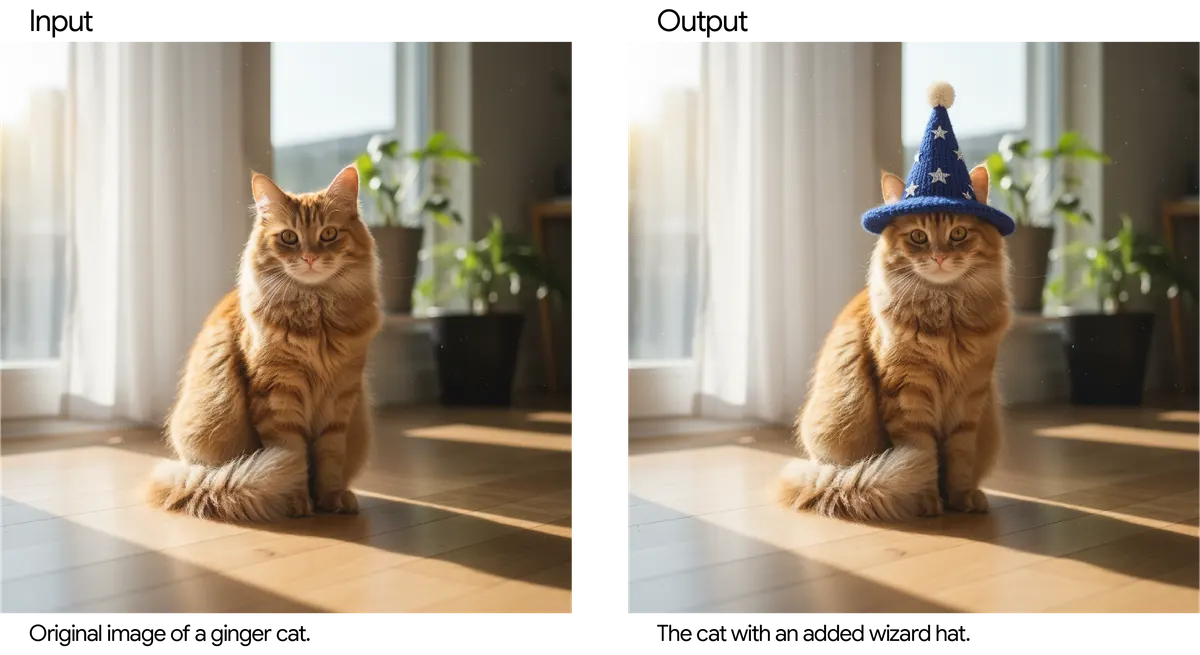
Gemini Image Edit: Add an Element
Adds an object to your own photo while matching its lighting.
 Prompt
GPT Image: Action Scene from a Person Photo
Official OpenAI example prompt for "Action Scene from a Person Photo". It edits input image(s) you upload, keeping everything else unchanged.
 Tool
Photoroom
Photoroom creates product and portrait pictures from your phone: remove and change backgrounds and showcase products.
 Tool
Topaz Labs
Topaz Labs makes deep-learning photo and video enhancement software for noise reduction, sharpening and upscaling.