
The prompt
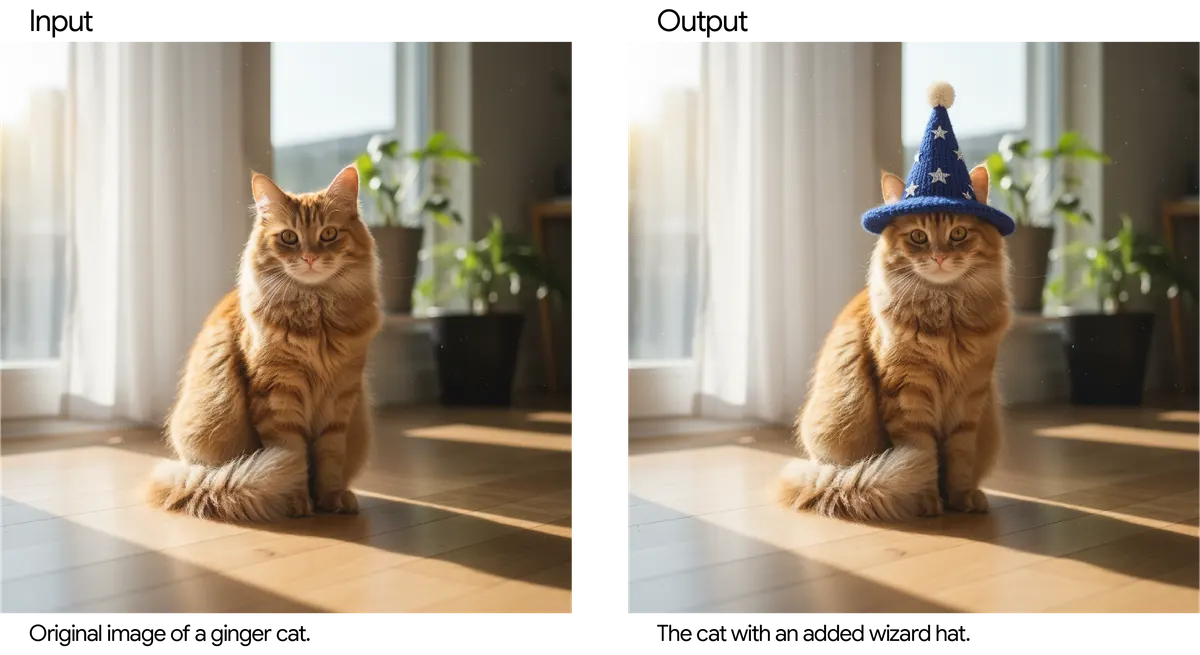
Using the provided image of my cat, please add a small, knitted wizard hat on its head. Make it look like it's sitting comfortably and matches the soft lighting of the photo.What it is
Google's prompting guide for Gemini 2.5 Flash Image uses this prompt to show adding an element to an existing photo. You upload a picture of your cat and ask for one small addition: a knitted wizard hat. The key parts are "Using the provided image", which tells the model to edit rather than create from scratch, and the instruction to match "the soft lighting of the photo", so the hat doesn't look pasted on. The blog shows the edited cat photo as the result.
مثال رسمي من Google بيزيد غرض جديد (طاقية ساحر محبوكة) عصورة قطتك، وبيخلّيه ماشي مع إضاءة الصورة الأصلية.
Examples
Prompt shown with its result in the source
PromptUsing the provided image of my cat, please add a small, knitted wizard hat on its head. Make it look like it's sitting comfortably and matches the soft lighting of the photo.Expected output: Copied verbatim from the Google Developers Blog post, which shows the result generated from this exact prompt.
Tips
- Start with "Using the provided image of ..." so Gemini edits your photo instead of making a new one.
- Name the lighting you want the new object to match.
Related
 Prompt
GPT Image: Action Scene from a Person Photo
Official OpenAI example prompt for "Action Scene from a Person Photo". It edits input image(s) you upload, keeping everything else unchanged.
 Prompt
FLUX.2: Turn an Edit Request into One Concise Image-Editing Instruction
You are FLUX.2 by Black Forest Labs, an image-editing expert. You convert editing requests into one concise instruction (50-80 words, ~30 for brief requests). Rules: - Single instruction only, no comm
Prompt Grok Imagine Edit: Change One Detail, Keep the Rest
Replace the metal watch strap with a brown leather strap with cream stitching. Keep the same wrist, the same shirt cuff, the same angle, and the same desk.
Prompt Qwen-Image: Edit Prompt Enhancer for Image Editing Instructions
# Edit Prompt Enhancer You are a professional edit prompt enhancer. Your task is to generate a direct and specific edit prompt based on the user-provided instruction and the image input conditions. Pl
 Tool
Topaz Labs
Topaz Labs makes deep-learning photo and video enhancement software for noise reduction, sharpening and upscaling.
Prompt LLM Auditor: Minimally Revise an Answer From Findings
You are a professional editor working for a highly-trustworthy publication. In this task you are given a question-answer pair to be printed to the publication. The publication reviewer has double-chec