
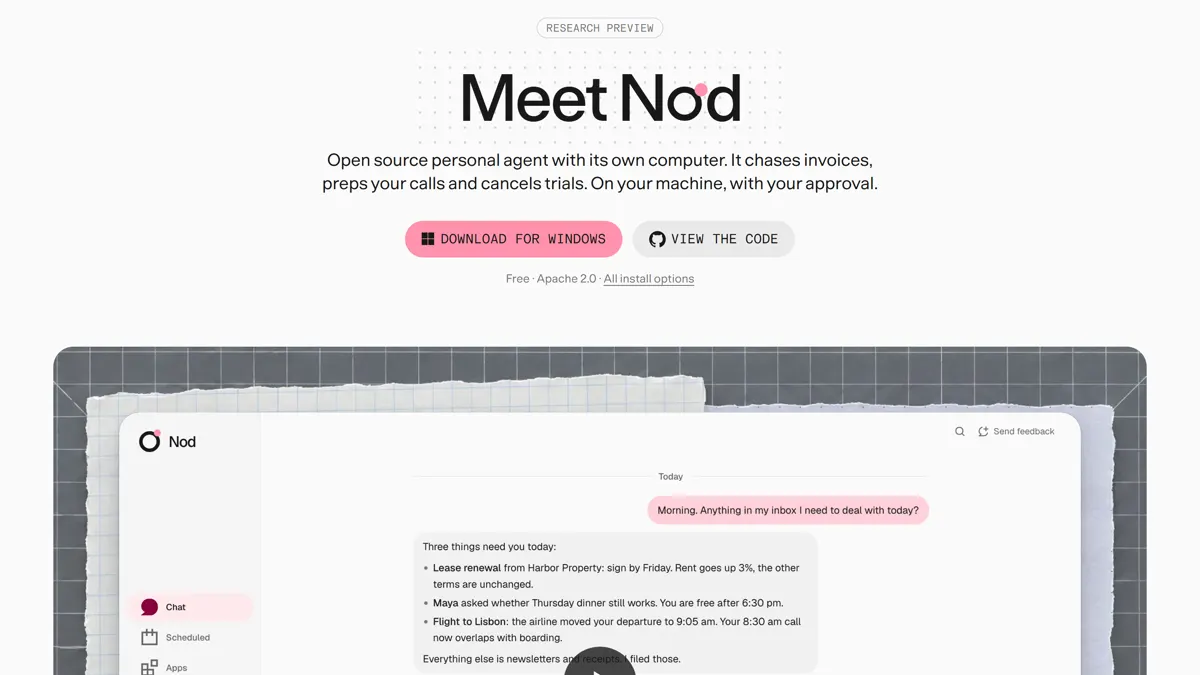
What it is
Nod is a standalone app from n8n Labs, a team inside n8n that experiments outside the core product. It is separate from n8n and from the n8n AI Assistant, and you don't need an n8n account. You install it on your Mac, Windows PC or your own server, connect a model and your accounts, and ask for something in the app, on Telegram or on WhatsApp. Nod works inside a private virtual machine on your computer, with its own Chromium browser, so it can finish jobs a chat assistant would hand back as a to-do list: cancel a subscription and turn down the retention offers, download invoices from supplier portals, pull numbers from a dashboard with no export, watch a price, or write a brief before each call. It works in Gmail, Calendar, Drive, Slack and Notion, and on websites with no integration. Repeating jobs can run on a schedule, and it remembers what you tell it; you can see, edit or delete each note. Before it sends, pays, posts or deletes anything you didn't ask for, a separate check confirms you asked for it, and text on a web page or in an email is treated as data, not orders. Saved passwords and cards are encrypted on your machine and entered through private forms the model can't read, and every sign-in, card use and action is logged with what it cost.
Who it's for
- Freelancers and solo operators who lose hours to invoices, portals and follow-ups
- Anyone who wants an AI to do errands on websites, not just answer questions
- n8n users who want a personal agent next to their shared workflows
- People who want to run an agent on their own machine with their own model, including a local one
Requirements
Requirements
- macOS 14 or later (Apple silicon or Intel), or Windows 11 x64 (preview) with WSL 2, hardware virtualization and 20 GB free disk; Linux x64 is a preview
- A model: a ChatGPT Plus or Pro plan, an API key (OpenAI, Anthropic, Gemini, OpenRouter and 20+ more), or a local model server such as Ollama
- About 1.8 GB (Mac) to 2.1 GB (Windows) to download for a local assistant
Setup
Download the app
Get Nod for Mac or Windows from nod.n8n.io or the GitHub releases page. The desktop app needs no Node.js, Docker or developer tools. On Windows, approve the WSL 2 setup when Nod asks for it.
Connect a model
Sign in with ChatGPT Plus or Pro, paste an API key from your provider, or connect a local model server such as Ollama. Paid providers bill you directly; a local model costs nothing per request.
Connect your apps and ask for one job
Connect Gmail, Calendar, Slack or Notion, then ask for one errand in the app, on Telegram or on WhatsApp, for example: download last month's invoices and file them.
Set your limits
Set a monthly spending limit (Nod checks in with you once a task passes $5 by default). If you don't want to share usage data with n8n, turn off Share usage data in Settings, Privacy & data.
Examples
Run from source (macOS or Linux)
Code# needs Node.js 24.21+, pnpm and Docker
git clone https://github.com/n8n-io/nod.git
cd nod
# then follow the README's Run from source sectionPros & cons
Pros
- Pro:Free and open source (Apache 2.0), from the team behind n8n
- Pro:Acts on real websites with its own sandboxed browser, not just chat
- Pro:Asks before it sends, pays or deletes; passwords and cards stay encrypted on your machine
- Pro:Choose your model: ChatGPT plan, API key or a free local model
Cons
- Con:Research preview: it can make mistakes, and the safety check is itself a model (n8n's test: Claude Haiku 5.5 let 8 of 240 unsafe actions through), so pick a strong model
- Con:The app is free but the model isn't; some early testers paid more than they expected
- Con:Stops when your laptop sleeps; keep it on an always-on Mac mini or a server for schedules
- Con:Basic usage data goes to n8n by default for new users; app connections go through a service n8n hosts
Related

n8n-io/n8n
Fair-code workflow automation platform with native AI capabilities. Combine visual building with custom code, self-host or cloud, 400+ integrations.
enescingoz/awesome-n8n-templates
280+ free n8n automation templates — ready-to-use workflows for Gmail, Telegram, Slack, Discord, WhatsApp, Google Drive, Notion, OpenAI, and more. AI agents, RAG chatbots, email automation, social media, DevOps, and document processing. The largest open-source n8n template collection.

lexmount/moli
Best headless browser for AI agents. Lite, Fast, High-Compatibility. Built in Rust
jianchang512/pyvideotrans
Translate the video from one language to another and embed dubbing & subtitles.
 Tool
n8n
Open-source workflow automation with AI agent nodes.
 Tool
Browse AI
Browse AI scrapes web data, monitors webpage changes and turns websites into APIs.