
What it is
Learning Output Style (plugin name "learning-output-style", version 1.0.0, authored by Anthropic) recreates the unshipped "Learning" output style for Claude Code. It also includes all the functionality of the explanatory-output-style plugin. It works through a SessionStart hook that injects extra context at the start of every session. That context tells Claude to take an interactive teaching approach, where you write key parts of the code yourself instead of Claude implementing everything automatically. The plugin enables two modes. In Learning Mode, Claude looks for chances for you to write 5-10 lines of meaningful code, mainly business logic and design choices where your input matters. It prepares the context and location for your contribution, explains the trade-offs, and guides your implementation. Claude requests contributions for: - business logic with multiple valid approaches - error handling strategies - algorithm implementation choices - data structure decisions - user experience decisions - design patterns and architecture choices Claude implements things directly when there is no meaningful choice to make, such as boilerplate or repetitive code, obvious implementations, configuration or setup code, and simple CRUD operations. In Explanatory Mode, Claude gives educational insights before and after writing code. These come in a distinctive "★ Insight" block containing 2-3 key points. They focus on specific implementation choices, patterns and conventions in your code, trade-offs and design decisions, and codebase-specific details rather than general programming concepts. The README notes that this SessionStart hook pattern is roughly equivalent to CLAUDE.md, but more flexible, and it can be distributed through plugins. The plugin's philosophy is that learning by doing beats passive observation, shifting the interaction from "watch and learn" to "build and understand." The README warns not to install it unless you accept the token cost of the extra instructions and the interactive nature of learning mode.
Who it's for
- Developers who want to build practical skills by writing meaningful logic themselves while working with Claude
- Learners who want educational insights about implementation choices and codebase patterns
- Previous users of the explanatory-output-style plugin, since this plugin includes all of that functionality plus interactive learning
- Users who liked the idea of the unshipped Learning output style
Requirements
Requirements
- Claude Code with plugin support (the plugin relies on a SessionStart hook)
- Willingness to accept the token cost of the plugin's additional instructions and the interactive nature of learning mode
هاد البلاغن بخلّي Claude يعلّمك وإنت عم تشتغل. بدل ما يكتب كل الكود لحالو، بيطلب منك تكتب الأجزاء المهمة عند نقاط القرار، وبيشرحلك ليش انعملت الاختيارات بالكود.
Examples
Example interaction where Claude requests a contribution
Prompt**Claude:** I've set up the authentication middleware. The session timeout behavior is a security vs. UX trade-off - should sessions auto-extend on activity, or have a hard timeout?
In `auth/middleware.ts`, implement the `handleSessionTimeout()` function to define the timeout behavior.
Consider: auto-extending improves UX but may leave sessions open longer; hard timeouts are more secure but might frustrate active users.
**You:** [Write 5-10 lines implementing your preferred approach]Expected output: This shows the kind of exchange learning mode produces. Claude sets up the context, points to the exact file and function, explains the trade-off, and leaves the meaningful 5-10 lines of decision-making code for you to write.
Educational insight format
text`★ Insight ─────────────────────────────────────`
[2-3 key educational points about the codebase or implementation]
`─────────────────────────────────────────────────`What it does: This is the format Claude uses for educational insights about implementation choices, patterns, and trade-offs in your codebase.
Related
 Skill
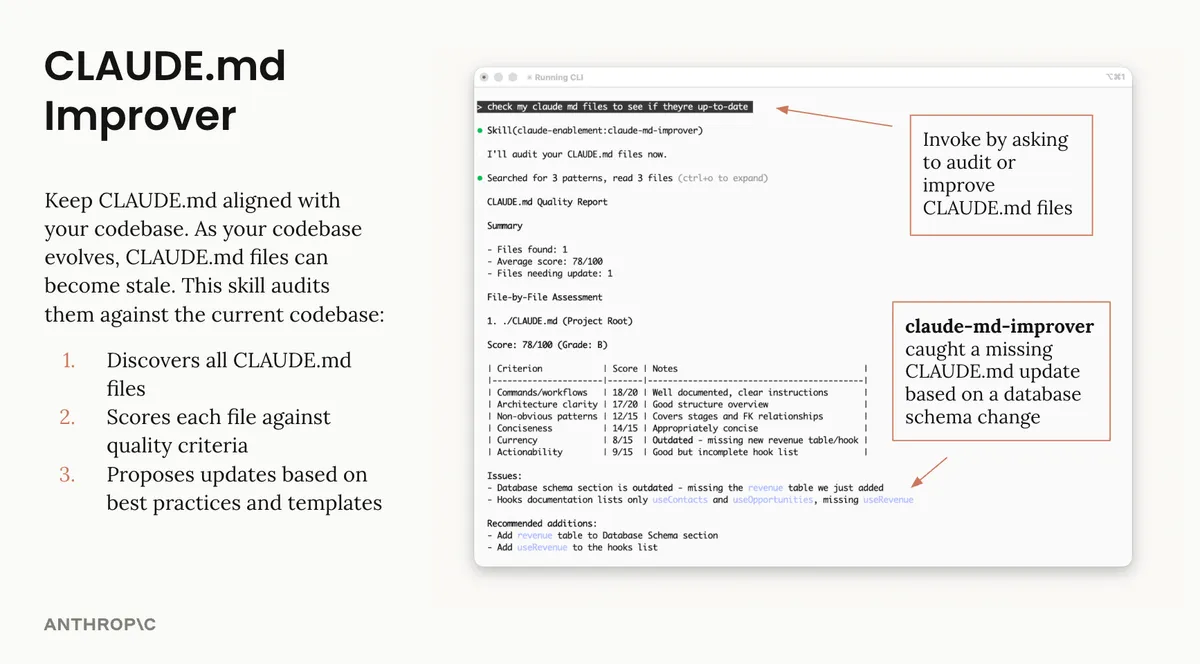
Skill claude-md-management
Tools to maintain and improve CLAUDE.md files - audit quality, capture session learnings, and keep project memory current.
 Skill
Skill explanatory-output-style
Adds educational insights about implementation choices and codebase patterns (mimics the deprecated Explanatory output style)
 Skill
Skill explanatory-output-style
Adds educational insights about implementation choices and codebase patterns (mimics the deprecated Explanatory output style)
 Skill
Skill learning-output-style
Interactive learning mode that requests meaningful code contributions at decision points (mimics the unshipped Learning output style)
 Skill
Skill Understand-Anything
Graphs that teach > graphs that impress. Turn any code into an interactive knowledge graph you can explore, search, and ask questions about. Works with Claude Code, Codex, Cursor, Copilot, Gemin...
 Skill
Skill compound-engineering
Brainstorm, plan, debug, review, and compound learnings with AI agents