
What it is
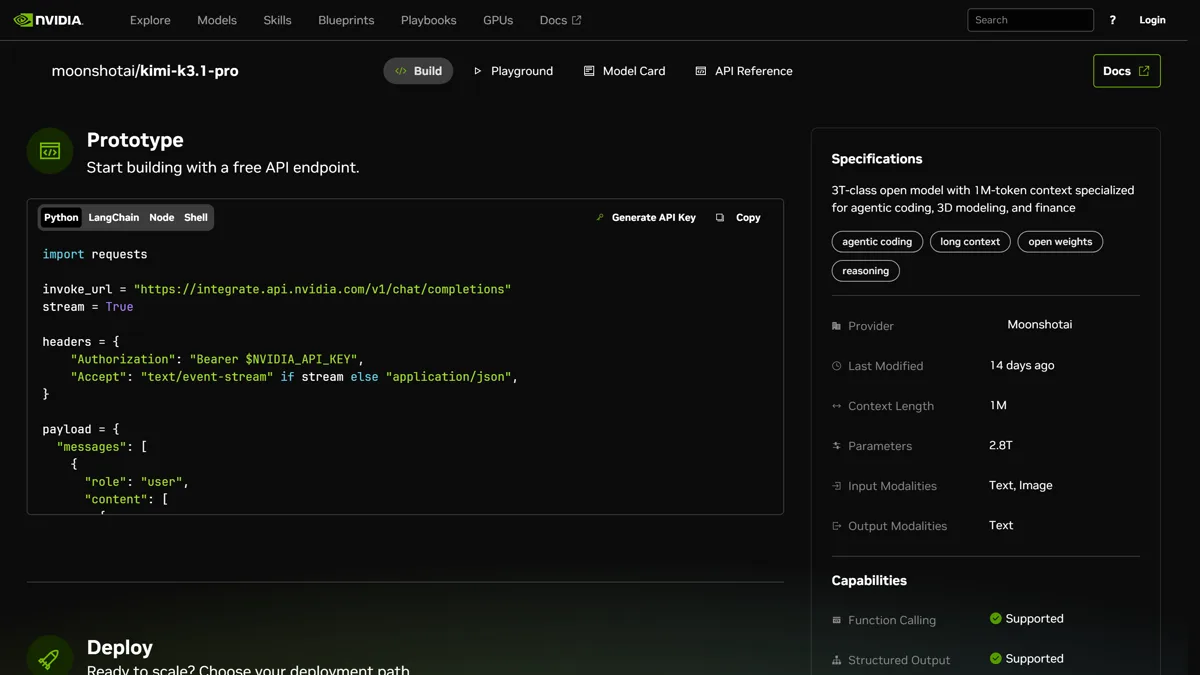
Kimi K3.1 Pro is a large Mixture-of-Experts model from Moonshot AI: 2.8 trillion total parameters (104 billion active), a 1,048,576-token context window, and text, image and video input. Moonshot pitches it for agentic coding, 3D modelling (CAD) and finance. NVIDIA hosts the model on build.nvidia.com. The page says "Start building with a free API endpoint": you make an NVIDIA account, press Generate API Key, and call https://integrate.api.nvidia.com/v1/chat/completions with the model name moonshotai/kimi-k3.1-pro. Any OpenAI-compatible client works. The model card is clear that the model is not owned or developed by NVIDIA. The free service is a trial governed by the NVIDIA API Trial Terms of Service and the NVIDIA Open Model Agreement; the base model is under the Kimi K3.1 Pro License, Moonshot's own licence.
Who it's for
- Developers who want to test a top open coding model before paying for it
- Teams comparing coding models for an agent or IDE tool
- Anyone already using an OpenAI-style client who wants to try Kimi with one changed model name
Requirements
Requirements
- An NVIDIA account
- An NVIDIA API key (Generate API Key on the model page)
- Any OpenAI-compatible client, or curl
Setup
Open the model page
Go to build.nvidia.com/moonshotai/kimi-k3_1-pro and sign in with an NVIDIA account.
Generate an API key
Press Generate API Key above the code sample and keep the key in an environment variable (NVIDIA_API_KEY), never in your code.
Call the model
Send a chat completion to https://integrate.api.nvidia.com/v1/chat/completions with "model": "moonshotai/kimi-k3.1-pro". In an OpenAI SDK, set base_url to https://integrate.api.nvidia.com/v1.
Plan for the limits
The free endpoint is a trial for building and testing. NVIDIA forum threads describe a default of about 40 requests per minute and 429 errors when agents burst. For production, use a paid provider or Moonshot's own API.
Examples
Python with the OpenAI SDK
Codefrom openai import OpenAI
import os
client = OpenAI(base_url="https://integrate.api.nvidia.com/v1", api_key=os.environ["NVIDIA_API_KEY"])
r = client.chat.completions.create(
model="moonshotai/kimi-k3.1-pro",
messages=[{"role": "user", "content": "Write a Python function that parses a CSV file."}],
)
print(r.choices[0].message.content)Pros & cons
Pros
- Pro:Free trial endpoint to test before you pay
- Pro:OpenAI-style API: change the base URL and the model name
- Pro:1M-token context and strong vendor-reported coding scores (Terminal-Bench 4.0: 65.7%)
- Pro:Open weights on Hugging Face under Moonshot's licence
Cons
- Con:A trial, not for production; the terms and the free endpoint can change
- Con:Rate limit around 40 requests per minute per NVIDIA's forum (not an official number)
- Con:NVIDIA hosts it but did not make it; benchmarks are vendor-reported
- Con:Custom Kimi K3.1 Pro License, not Apache or MIT: read it before commercial use
Related
 Tool
Cursor
AI-powered code editor.
 Tool
GitHub Copilot
AI pair programmer inside your editor.
 Tool
Warp
Build your software factory on Warp: factories as code, any model or harness, with evals, benchmarks, and self-improvement built in.
 Tool
Windsurf (by Cognition)
Manage fleets of local and cloud agents from one surface. Plan, delegate, review, and ship without leaving your editor.
 Prompt
Claude: Avoid Over-engineering
Keeps coding agents focused: no extra features, refactors or abstractions beyond the request.
 Prompt
Ask One Clarifying Question Before Building
Given some instructions, determine if anything needs to be clarified, do not carry them out. You can make reasonable assumptions, but if you are unsure, ask a single clarification question. Otherwise