
What it is
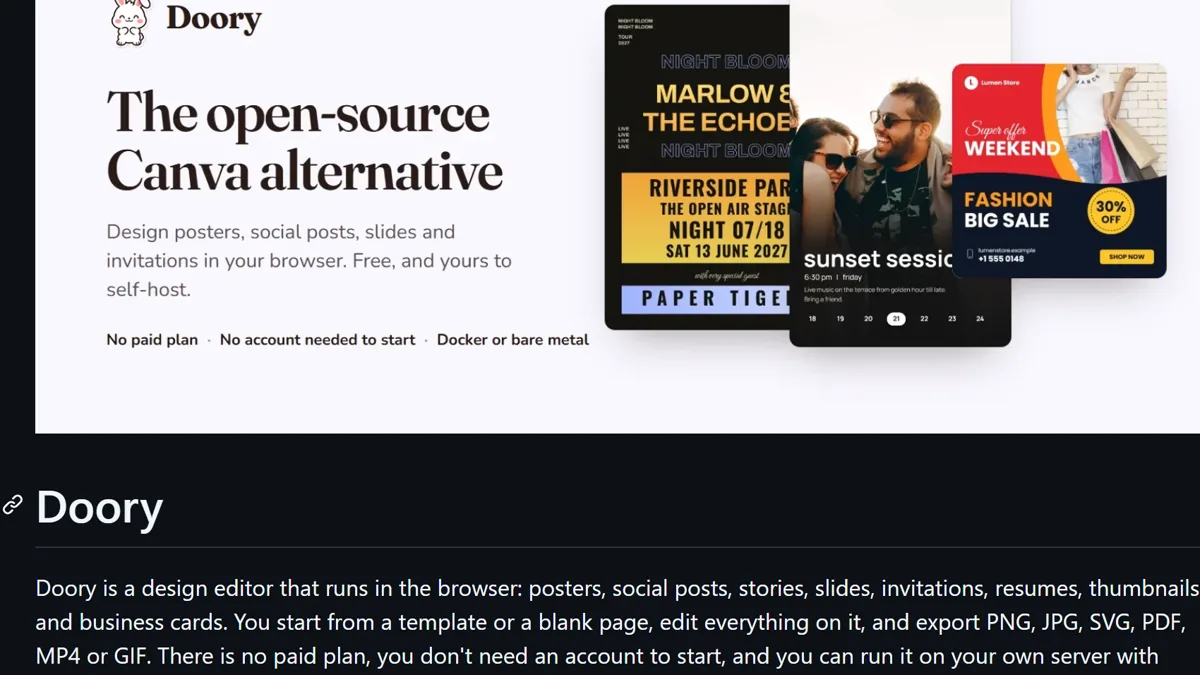
Doory, by Siam (GitHub shaongitbd), is a design editor in the browser for posters, social posts, stories, slides, invitations, resumes, thumbnails and business cards. You start from a template or a blank page and export PNG, JPG, SVG, PDF, MP4, WebM or GIF; print PDFs can have bleed and crop marks. The editor has text effects and curved text, about 27,500 icons and illustrations, QR codes, background removal that runs in the browser, layers and groups, several pages per design, 27 enter/exit animations, page transitions, CC0 music loops and sound effects, a present mode, share links, comments, version history, real-time co-editing and brand kits. Guests can design without an account; their work is saved in that browser. Self-hosting uses Docker Compose (React and Fabric.js in the browser; Django 5 and PostgreSQL on the server) or nginx and systemd. When MCP_ENABLED is on, the server exposes a Model Context Protocol endpoint at /mcp: an assistant with a user's token can list, create and edit designs, fill templates by field, and export pages.
Who it's for
- Creators and small teams who want a free Canva-style editor without a subscription
- Self-hosters who want design tools on their own server
- People who want Claude or Cursor to make and edit designs through MCP
Requirements
Requirements
- A modern browser to design (no account needed on the hosted editor)
- To self-host: Docker Compose (or nginx + systemd), PostgreSQL, optional Redis and S3-compatible storage
- For the AI connection: your own server with MCP_ENABLED=true and an MCP client that supports the HTTP transport
Setup
Try it
Open the hosted editor at doory.art and pick a template or a size. No sign-up; guest designs are kept in that browser.
Self-host
cp .env.example .env, set DJANGO_SECRET_KEY and POSTGRES_PASSWORD, run docker compose up -d --build, then docker compose exec api python manage.py createsuperuser. Open http://localhost:8080.
Add starter content
A new site starts empty. Run seed_gallery, sync_fonts, seed_templates, seed_elements, sync_element_packs (about 120-130 MB of icons) and sync_models, as listed in docs/self-hosting/content.md.
Connect an AI assistant
Add MCP_ENABLED=true and COMPOSE_PROFILES=mcp to .env and run docker compose up -d. In Settings > AI assistants (MCP) create a token with the permissions you want (it is shown once and expires within a year), then add https://your-domain/mcp to your client with Authorization: Bearer <token>.
Examples
MCP client config
Code{"type": "http", "url": "https://your-domain/mcp", "headers": {"Authorization": "Bearer <your Doory token>"}}Pros & cons
Pros
- Pro:No paid plan, no locked features, no ads, no watermark
- Pro:No account needed to start
- Pro:Exports images, PDF (with print marks), MP4 and GIF
- Pro:Self-hostable, with real-time co-editing and brand kits
- Pro:MCP server so AI assistants can create and edit designs
Cons
- Con:Young project (created 2026-10-10): only ten starter templates
- Con:Guest designs live only in that browser
- Con:A self-hosted site starts empty: you load templates, fonts and icons yourself
- Con:The AI (MCP) connection is off by default and needs your own server
- Con:Attribution Assurance License: if you run it for others, keep the licence and show the author's credit in the app
Related
FujiwaraChoki/supoclip
An open-source OpusClip alternative: turn a long video into vertical clips with AI-picked moments, virality scores, face tracking and word-synced subtitles.

Comfy-Org/ComfyUI
The most powerful and modular diffusion model GUI, api and backend with a graph/nodes interface. The fastest local inference engine in the world.

harry0703/MoneyPrinterTurbo
利用 AI 大模型和自动化工作流,根据主题或关键词一键生成高清短视频。Generate HD short videos from a topic or keyword with an automated AI workflow.

Anil-matcha/Open-Generative-AI
Unrestricted Open-source alternative to AI video platforms — Free AI image & video generation studio with 600+ models (Flux, Midjourney, Kling, Sora, Veo). No content filters. Self-hosted, MIT licensed.

hypit-ai/hypit
Clone any viral video with AI agents. Not just a script, the whole workflow: swap the face, the words, the B-roll, ship 100 variants in one command, and get your 100M views.